The Skills Embedded Engineers Need: Part Two

Last week I posted Part One of a two-parter based on Karen Field’s recent article, “10 Skills Embedded Engineers Need Now”, which was published on Embedded.com.

Matt Liberty thinks engineers should get out of their comfort zones, with special emphasis – never bad advice to engineers – on keeping a good balance between the interpersonal and engineering skills. Jean LaBrosse wants engineers to “become skilled at expressing yourself” (both in words and graphics). No, engineers don’t need to become artists.  But they “should have as a fundamental skill the ability to use block diagrams, state machine diagrams, pictures or clouds or light boxes or whatever tool can aid in conveying concepts. Particularly if they are trying to explain how something works.”

These overlapping points are excellent. I’ll go so far as to say that I’ll give a little bit on engineering talent to have someone on our team that can communicate well and has great interpersonal skills. Engineering prowess is not everything. As Jean LaBrosse says, you need to be able to communicate effectively to be successful.

Getting some RTOS experience is what Henry Wintz finds important, given the high demand for it (and the salary premium placed on it). “Given that at any given point the CPU can be called to run a different task,” engineers with RTOS under their belt “know how to make sure that the resource they are currently using is not going to be trampled on. In short, they know how to protect resources from other tasks using the service unexpectedly, while maintaining performance.”

I go along with the critical regions comment above, though at Critical Link we do see the shift to much more embedded Linux and away from big RTOS’s.

Jen Costillos says to diversify your skills. Those working barebones might want to take a Linux driver class; conversely those working on large systems might want to try their hand at working barebones. She also advises “moving up the stack: Make a mobile app or learn some back-end server stuff. It will give you a new vocabulary and perspective.” She’s also a proponent of using off-the-shelf boards because it will allow an engineer “to focus on the hard, unique stuff.” This is certainly a position that Critical Link has been advocating for years. So ‘hear, hear.’

Software knowledge, even beyond C and C++, is important, but Elecia White thinks that “the newest trendy language is not as important as the newest, trendy processor technology….that’s just the nature of embedded.” (While we’re not so focused on “trendy” as we are on what makes sense for the industrial-strength apps our customers develop,  I’ll give another ‘hear, hear’ for the importance of processor knowledge for embedded engineers.)

Developing a systems engineering mindset is certainly something that we encourage at Critical Link, as does Adam Taylor, who writes, “I have seen a number of projects suffer because things like a clear defined requirement baseline, verification strategy and a plan for demonstrating compliance was not considered early enough in the project.”

The final piece of advice in the article came from Chris Svec, and that’s “learn wireless connectivity…specifically wifi and/or Bluetooth low energy (BLE). Given the growth of the Internet of Things, on both the consumer and industrial side, I’d say that this is pretty good advice.

With technology advancing so rapidly, it’s sound advice to embedded engineers to keep learning about the technical advances that will definitely help them advance their careers.
The Skills Embedded Engineers Need: Part One

Karen Field, on Embedded.com, had an interesting article a few weeks back.  In“10 Skills Embedded Engineers Need Now”, she asked a number of embedded development professionals (and one recruiter) what embedded engineers should have on their resume if they want to stay current.  (This is the first of two posts keying off of this article. Too much ground to cover to do it in just one!)

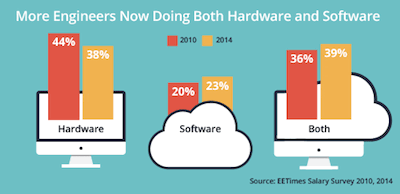
First, Karen provided a bit of context: the results of an EE Times survey that compared what embedded engineers were responsible for in 2014 vs. 201EE Times Embedded Survey0.

While the shifts weren’t that dramatic, what I found of interest was that, in both 2010 and 2014, such a high proportion of engineers were/are doing both hardware and software work.  With systems becoming more complex, not less, I found this a bit surprising. At Critical Link More to the point, I’m surprised that the shift to software-only (from 20 to 23%) is so small. From where I stand, software is just about everything these days. Hardware designs are important, and a significant portion of any project, but all of my customers are telling me that software is where the work is at.

Anyway, on to the roundup of the skills necessary for embedded engineers:

While Ken Wada noted that being able to write C or C++ code, along with the ability to handle mixed signal design, would make you “pretty much good to go in the embedded world,” he advises engineers to learn “the technologies that make the Internet possible,” e.g., XML.  I completely disagree that C/C++ makes you “pretty much good to go in embedded”. If you don’t know how to interact with the hardware, then you’re not going to be successful in embedded. You have to know how to deal with an interrupt, when and how to use a critical region, how to write code that executes efficiently, and debug techniques for embedded software. It really is a different world.

Michael Anderson advises engineers to “take advantage of all of the open source stuff that is out there.” And while you’re at it, join the community.  (While Anderson doesn’t mention it, grabbing available open source will certainly help the hardware engineers operate as hardware + software engineers.”) Rob Oshana is also in favor of “getting comfortable with open source software.” But don’t forget, embedded engineers should have a grasp on both software and hardware.

The header on the first point on open source was “You’ve got a search engine. Know how to use it.” This reminded me of the time before the internet became big. (Circa 1992: we’re talking way back here.)  I was the only person in my company who knew about what were called “usenet newsgroups” back then. I was a hero because, before Google existed, I could “google” in the groups to find someone else’s solution to problems we were experiencing. I guess engineers have been trying not to reinvent the wheel since that first engineer came up with the wheel!

Anyway, I’ll be back with next week with the rest of the skills list.


What’s new in HUD? Microsoft’s HoloLens.

A recent article on TechCrunch caught my eye. As, I guess, it was intended to.

The article was on the HoloLens, Microsoft’s entry into the “facespace” space, which lands somewhere between what Oculus is doing more or less successfully on the “power end” and what Google attempted to do with Glass (more or less unsuccessfully: it made most lists of the Top Ten Tech Flops of 2014) at the “convenience end.”

The HoloLens:

“…seems to be an augmented reality system capable of projecting faux-holograms to an eyepiece you wear. The net effect is the wearer “sees” a hologram in space all around him… In essence HoloLens is trying to blend the two [Oculus and Google Glass], forming a high definition augmented reality system within a constrained space.”(Source: Tech Crunch)

The examples that Microsoft was showcasing were work-based applications. You can see this for yourself at the HoloLens site, where, in Microsoft’s words, the:

“HoloLens puts you at the center of a world that blends holograms with reality. With the ability to design and shape holograms, you’ll have a new medium to express your creativity, a more efficient way to teach and learn, and a more effective way to visualize your work and share your ideas. Your digital content and creations will be more relevant when they come to life in the world around you.”

I don’t think that we’re going to all be wearing HoloLens around the office any time soon, any more than we’re all wearing Google Glass. But for gaming…

“In many games the screen area is cluttered by a HUD [Head’s Up Display], that is the numbers that show you how much health your character has left, or experience points or levels. Those numbers are an essential aspect of a game’s feedback system, but they bring a visual noise with them. In some cases they hem in the world of the game and make it less impactful. For games that are trying to be immersive or story-driven, for example, experience point counters dinging away at the top of the screen can be distracting. Conversely UI elements also need to be constrained so that they don’t interfere with the main game too much. So games often have muddled UI/world compromises that never feel quite right.” (Back to Tech Crunch here.)

The HoloLens promises to enable use of 30% more of the screen for the actual game.

That’s the promise, anyway. We’ll see if Microsoft can deliver on it any better than Google did with Glass…

There are obvious applications beyond gaming, of course….

A couple of months ago, I blogged about HUD in the automotive world. Taking the diagnostics/data completely out of the main field of view to limit interference with the primary task at hand could be an important concept when it comes to more tasks, like driving, that are more critical than gaming!


Robots in the vineyard

Regular blog readers may recall that I have an interest in robotics. Among other posts, last March I wrote about office robots, and in May I had a post about robots that do the milking on dairy farms. So, naturally, I was interested in a recent article in GizMag on machine vision robots designed to keep an eye on a vineyard’s grapes.

Viticulture – I’ll admit, I hadn’t known the word before, and would have thought there’d be an “n” in there (as in vinticulture); guess not – is very labor intensive, and requires those who run them to be continually walking up and down the rows to inspect the vines and the grapes.

Anyway, the VineRobot is being developed by a consortium of partners from wine-growing countries in the European Union:

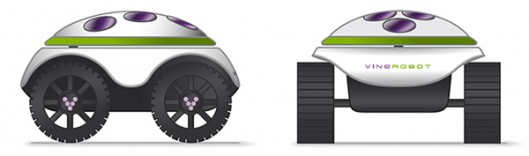
“The idea is that the solar-powered VineRobot will move autonomously on its four wheels, using RGB stereoscopic machine vision and GPS to navigate its way up and down the rows of the vineyard.”

“Along the way, it will utilize technologies such as chlorophyll-based fluorescence sensing and infrared thermography to non-invasively monitor parameters such as vegetative growth, grape yield, grape composition (from which grape ripeness can be deduced), and soil moisture. That data will be wirelessly transmitted from the robot to a satellite, and from there to an app on the viticulturist’s mobile device.” (Source: GizMag.)

The VineRobot will be faster, cheaper, better than humans, and will also, according to GizMag, be cheaper than doing inspections with drones.partners-scheme1

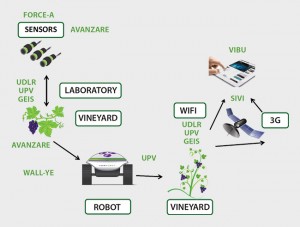
I went over to the VineRobot site to see if I could get more technical detail, but what I found was pretty high level. The visit was, nonetheless, pretty interesting. And I did find this schematic there. (The green lettering represents the different entities that are working on various parts. I thought at first that the object to the right that looks like a bird in flight was supposed to be a bird in flight, which I found a bit puzzling. But then I realized it represents satellite communication. Maybe I need new glasses.)

The prototype, which you can see on the site, looks a bit clunky, but the final design is pretty cool.

Vine RobotWe have vineyards in upstate New York, but in our area we have more apple orchards, so I was wondering if there are any robot efforts there. Sure enough, I found an article on Visions Systems Design that’s all about robotic apple picking.

Remember how you used to bring your kids to the orchard to do some apple picking? I guess that someday I’ll be taking the grandkids to watch a robot do it for them.


“The Internet of Things that See”

As more and more things are added to the Internet of Things (IoT), more and more gets written about it.

With the embedded technology that Critical Link provides, we’ve been part of the IoT even before anyone was calling it that. So we’re always interested to read about it and, in our own small way, writing about it. (Of course, as engineers we’re mostly focused on actually doing something about it by continuing to develop the products that enable IoT.)

Anyway, while I was “grazing”, I came across something written by Brian Dipert  of the Embedded Vision Alliance, an association focused on promoting (and educating on) computer vision technology. Brian’s article, “The Internet of Things that See”, is a round-up of some of the embedded vision applications. Video surveillance is, of course, a biggie. (Interesting, isn’t it, that now when we hear about a crime that’s reported we’re surprised when there’s nothing captured on video?) Brian notes that surveillance technology has historically required a human to monitor it to determine whether something is a true threat (human intruder vs. lost possum vs. blowing plastic bag). The technology is now moving toward more machine-to-machine applications.

“However, as analytics algorithms grow more robust, in the process more effectively accounting for non-ideal lighting and other environmental conditions, they’re increasingly able to discern between disconcerting and of-no-concern movement, and (via face recognition) between humans and other objects.” (Source: Embedded Vision Alliance)

Surveillance is not just about catching bad guys. Brian gives the examples of using surveillance software (taking advantage of advanced algorithms for analyzing facial recognition) to keep track of an elderly Alzheimer’s patient, and of using it for swimming pool safety. He then writes about applications that don’t involve monitoring human beings. How about a dumpster that can alert the waste-removal company that it’s getting full? (There’s an app for that…) And ranchers being alerted to sick cattle in his herd. (Yep, there’s an app for that, too.)

An interesting article, if you want a high level view of what’s going on when it comes to The Internet of Things that See.

Laughing Matter

There are a lot of interesting applications for facial recognition software, but I have to say one of the most interesting (if not necessarily the most useful) is one that a Barcelona comedy club was experimenting with a few months back.

Rather than charge a flat ticket price, the club decided that patrons should pay based on the value they were getting out of a show. For a comedy club, that means charging for the laugh. So Teatreneu attached tablets with an app called Pay per Laugh (from Glassdoor) installed. Every time someone in the audience laughed, they were charged 0.30 Euros. (Patrons were protected on the upside, the ticket charge was capped at 24 Euros. Every laugh over and above 80 was free. As it turned out, the average was 49 laughs per show.)

“Pay per Laugh (PPL) is an application that, once installed on an iPad, is able to detect laughing, crying or any facial expression previously programmed. The software was developed with a simple FaceTracker, a facial expressions detector that counts, lists and generates statistics of the amount of laughs detected. Each time it recognizes a smile the iPad takes a picture and sends it to the PPL server, creating and monitoring the statistics.”

“Pay per Laugh has several functionalities. Depending on the programming parameters of the facial detector, it is capable of recognizing different kinds of emotional states. As long as those are a physical expression (laugh-happiness, cry-sadness, surprise face-fascination…)!” (Source: LBBOnline)

I would think that the novelty would wear off pretty soon, and that at least some members of the audience would be focusing so much on keeping a poker face that they’d stop paying any attention to the show. And I can’t help thinking about ‘what next’? Maybe we’ll pay less for our cable if we look bored when we’re watching a show. Maybe PPL can be combined with GoPro, and we can pay for a vacation based on how much we’re enjoying it. And maybe, since we just had Groundhog Day, they can forget looking at Punxsutawney Phil’s shadow, and figure out from the look on his face whether we’re going to have an early spring. (Not that, in upstate New York, we ever get an early spring.)

Anyway, it was a novel application of facial recognition technology, that’s for sure.


Source for some of the background info: BBC.

How printed circuit boards were made in 1969

A few weeks back, Tim Iskander, one of Critical Link’s senior engineers, sent me this link to a video that Tektronix made in 1969. The video, which Tim found on the Museum of Vintage Tektronix Equipment, demonstrates how circuit boards were designed and manufactured back then. As Tim commented, things are a “wee bit more automated these days.”

I’ll say.

Plus I will note that engineers no longer wear high water pants and white socks. (For the most part.)

The process in the video is a bit before my time –  I was a bright enough kid, and I was always going to be an engineer, but in 1969 I was thinking building blocks, trucks and Tinker Toys, not circuit boards. So I don’t have a lot of direct experience with some of the way things were done nearly a half century ago. But I did use graph paper.

This is a long video. I didn’t time it, but it took over a half hour to get through the whole thing. So you may want to view it over lunch. (These days, not only are the processes faster, so are the videos. This would be chunked into shorter pieces for the YouTube generation.)

A couple of things struck me. One was the background music, which was a combination of health class film, old detective shows, weird sci-fi, and Bambi. I think that this was pretty standard for industrial films back then, but, sheesh, this was the same year as Woodstock?

Another thing I found very interesting is how the process of both schematic design and layout are handled concurrently during the design process. The electrical engineer not only defines the interconnects between the various components, but also identifies the routes for the traces (both top and bottom layers) at the same time. Today, of course, we perform these steps almost completely separately.

Back then, the components were big, the traces were thick, and the layer count very low. But, you can see the origins of some of the fundamental processes still performed today, in much the same way. The way the vias are plated and the use of screens for the copper plating process, to name a couple.

The design process is even performed at a 4x zoom over the finished board size. Of course today, we zoom in and out with ease, but they actually drew the design on transparent film 4x the size of the finished product.

What an interesting look at how it used to be done!

Here’s the link to the video.


Pepperoni? Mushroom? The Eyes Have It.

At Critical Link, we have a lot of interest in vision technology. Our MityCAM and MityCCD cameras are a key part of our business. And I just, in general, like seeing new applications of vision technology in action – even if, as happened recently in Germany, it did end up getting me a ticket. (I blogged about it here.)

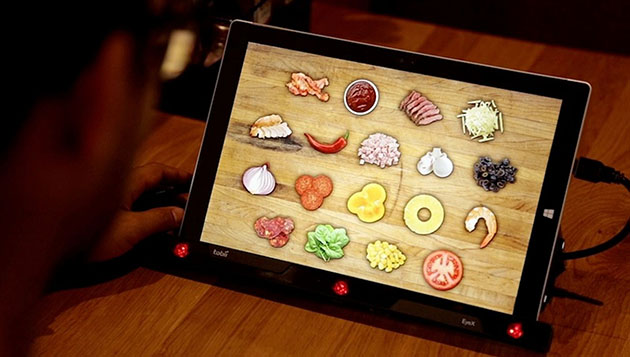
All this said, I don’t know quite what to make about a new system for ordering pizza toppings that Pizza Hut is trying out, which I read about in Engadget a couple of months back. With the Subconscious Menu – which is being trialed – the customer looks at tPizza Hut Menuhe tablet and, based on how long their eye lingers on any one object, the system analyzes what toppings they want.  I don’t know about you, but my eye might be drawn to that green stuff, wondering whether someone actually wants Bibb lettuce on their pizza. But Pizza Hut claims that the accuracy rate is about 98%.  Here I’m again a bit skeptical. I’m sure there are many diners who just might go along with it when presented with the information that a really smart computer system analyzed their eye movements and decided that they really did want the green stuff that looks like Bibb lettuce. Instead of what they really wanted, which was pepperoni and pineapple. (Pineapple?)

A video showing how all this works can be found here.

As ever, I want to know more about the underlying technology, which comes from Tobii, which focuses on eye tracking.

Eye tracking technology has a lot of applications:

“Leading consumer goods companies use eye tracking to optimize product packaging and retail shelf design. Market research companies and major advertisers use it to optimize print and TV ads. Product companies use it to optimize interaction design. Web companies use it to optimize online user experiences. And universities use it for research in psychology, neurology and medicine.”

“New types of medical diagnostics have also been made possible by eye tracking, as well as safety applications that monitor user attention in critical situations.”(Source: Tobii)

Gaming is also a biggie for eye-tracking. As is – or will be – the ordering of pizza toppings.

Challenges Facing IIoT in 2015, Part Two

Last week, I wrote about the first five of Rich Quinnell’s “10 Top Challenges Industrial IoT Must Overcome in 2015,” which appeared in EE Times in late December. Here’s a summary of the remaining challenges on this list.

Device management was the sixth challenge, with Rich relying largely on a quote to make his point:

“‘Intelligent devices usually have limited CPU power, limited memory, and limited disk space,'” says David Beberman, vice president of marketing at Aicas. ‘The technical challenge is to enable intelligent devices with the ability to be securely reconfigured and reprogrammed in large distributed systems within their resource limits, in a stable, resilient manner. Most intelligent devices have limited or no reconfiguration or reprogrammability capabilities. This limits the ability to push computation to the “edge” of the network and thus the ability to realize a flexible dynamic IIoT.'”

Power efficiency is something that we’re always keeping an eye on, and with more and more bells and whistles (like our MitySoMs!) embedded in IIoT applications, power consumption will be of increasing importance. Power efficiency is not just a challenge for individual devices, but with so many IIoT devices coming on board – think Carl Sagan here – power consumption is going to be a critical factor across the entire landscape. (Seems like just yesterday we were worrying about the power consumption of hosting providers’ data centers. The coming level of consumption will eclipse that.)

In the article, the assertion is made that the need for a common development environment also presents a challenge to IIoT, with software developers, cloud-based coders, and embedded developers all using different development tools. Rich quotes Mike Kaskowitz of Micrium, who says that:

“’Often, it is difficult for a single person to span this ecosystem, which is driving a need for pre-integrated solutions that deliver an end-to-end portfolio of embedded software, protocol stacks, and cloud services to facilitate the development of IIoT devices.'”

Maybe I’m being too short sighted, but in my view these two worlds are always handled differently. The skills needed to address the real-time nature of embedded applications are far different from those needed in the cloud. I do agree that pre-integrated systems (embedded+cloud) will help organizations deploy IIoT, and are even a requirement.  This will allow organizations to avoid having to develop embedded skills in-house. This may be the real point being raised here.

Acquiring talent and expertise is a perennial challenge in the tech world, and the IIoT will only place more demand on developers and on big data analysis gurus. (At Critical Link, we’re fortunate in that there are a number of excellent engineering schools around, and many young engineers – having grown to enjoy the upstate New York lifestyle – want to stay in our area.)

I had never really thought about it, but as we dig into and analyze our business data at Critical Link, I can really see the need in the world for many, many more data analysts in the future!

Somehow, I knew that the list would end with data, and it does, as Rich’s final challenge that IIoT will need to overcome is data diversity:

“…the vast variety of devices, applications, and implementations within the IIoT will result in a massively heterogeneous set of data. This not only includes variation in the format and interpretation of data (Celsius vs Fahrenheit, for instance), but in the quality, frequency, and timing of the data. The IIoT will need to adopt standards or find an algorithmic way of handling such data diversity.”

All I can say is that, with all these challenges, IIoT will have a pretty busy year on its hands.


Challenges Facing Industrial IoT in 2015

I’ve always been a sucker for end of old year/beginning of new year roundups and forecasts. We even did a little look back at 2014 on our own blog a few weeks back.

One of the more interesting roundup/what’s next pieces I saw was Rich Quinnell’s “10 Top Challenges Industrial IoT Must Overcome in 2015,” which appeared in EE Times in late December. One of the reasons I found it so interesting is that, as Rich points out, so much of the IoT buzz is around consumer goods. Don’t get me wrong, I’m as excited about consumer applications of IoT as the next guy – just ask me about my Nest, why don’t you – but our work is primarily on the industrial side.  Nice to see it getting this attention!

Anyway, Rich’s take on the challenges facing IIoT is a good one, which I’ll summarize quickly. (This will be a two-part blog, to be continued next week.)

Security is (understandably!) first up on Rich’s list. The attacks that tend to get the most attention are IT breaches, like the recent Sony one and the ongoing stream of retail organizations that have had consumer credit card data hacked. But industrial systems are vulnerable, and attack on these systems – think SCADA, think the grid – could cause not only tremendous economic destruction, but loss of life as well.  I also find that in the IoT development community, security is topic #1.

Standardization was next, as, in Rich’s words, “For there to be a true industrial Internet of Things, there must be an ability for diverse devices and systems to share information and interact.” The challenges within this challenge are the existence of proprietary designs and interfaces, and the fact that there are competing groups trying to establish the standard. In my view, multiple proprietary designs will inevitably become widely used and will become de-facto “standards”.

Rich views the ability to get at the big data that the IIoT produces as one of the most significant benefits that the IIoT offers. To maximize the value of big data, organizations are going to have to break down silos – “organizational, data, and system” – that currently stand in the way. I see this as always being an intra-organizational challenge as opposed to something that can be standardized across the board. Each organization’s needs from the data are just too diverse.

Rich sticks to the data front, and names adopting data-centric design as the fourth challenge.

The advent of the IIoT will require that industrial equipment developers change their mindsets about what their devices are to do. They will still need to perform their physical functions, but they will also need a new focus on generating and receiving data. (With data acquisition such a big part of so much of what we do here at Critical Link, I especially liked this challenge.)

Again focusing on data, Rich feels that IIoT vendors are going have to develop hybrid business models, and offer services that exploit their product’s data-centric design. This is not only being driven by IIoT, but also by business innovation within the economy, as the realities of the state of manufacturing in the United States have taken hold. As manufacturing has moved to China to keep costs low, many businesses are looking to build their revenue streams, improve their margins, and increase their overall value to the customer by offering more services.

Next week, I’ll get into the other five challenges on Rich’s list.